


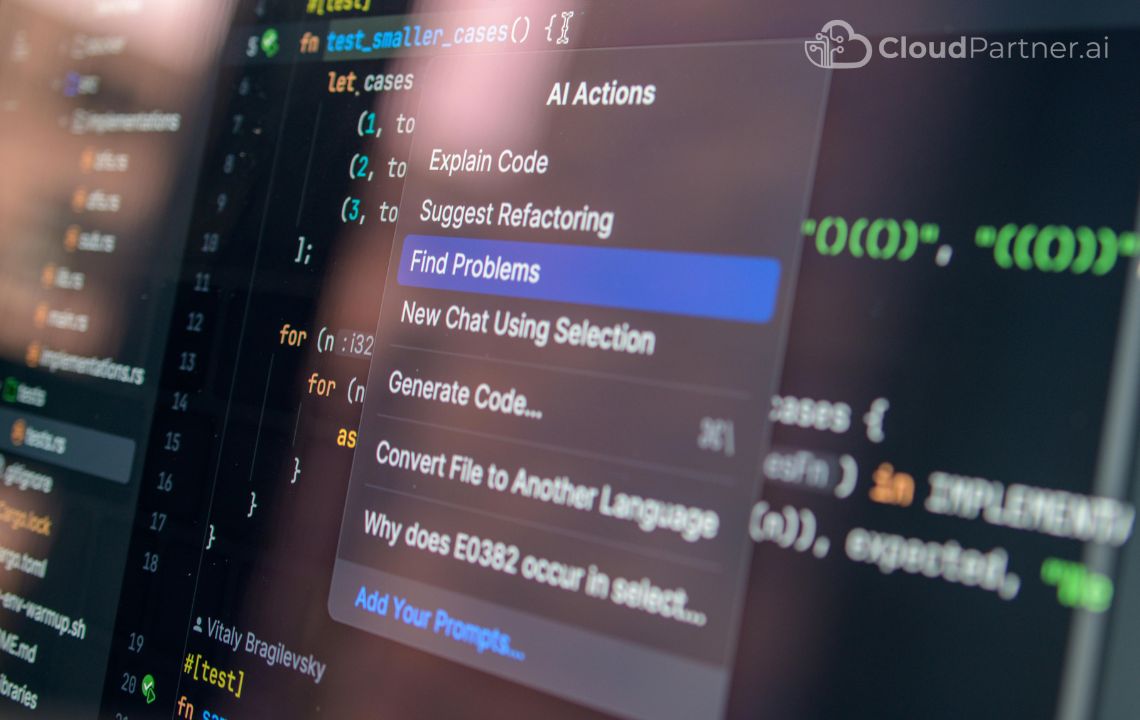
Software applications are always a leading priority for businesses of all sizes and natures. Whether it is mobile apps, cloud platforms, or websites, software applications are deep-rooted in the modern business world.
Software applications are regarded for their ability to be prompt, secure, scalable, and easy to use. But one error can prove to be costly, resulting in potential financial loss, impact on goodwill, or even customer complaints. Moreover, companies are releasing software updates time and again to meet the evolving user demands. That is why quality testing and debugging are considered vital checks for every software application.
When these tests involve manual intervention, the process becomes time-consuming, exhausting, and slightly prone to errors. That is when the need to automate these tasks came to light and led to the advent of Artificial Intelligence in testing and debugging. AI integration can scan the flaws in the software faster than human tests and suggest quick fixes even before they escalate. This article is your guide to understanding the substantial value of Artificial Intelligence in software testing and debugging.
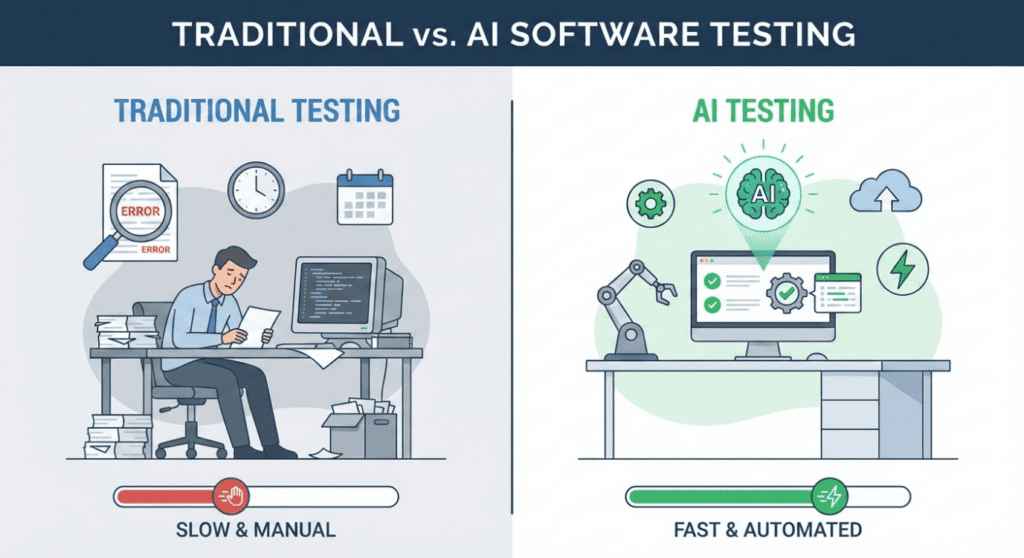
Problems with Traditional Testing Traditional testing methods have several limitations that affect both technical teams and business outcomes. Below are the key challenges explained in detail.
1. Time-Consuming
Manual test case creation and execution require significant human effort. Testers must write detailed test scenarios, prepare test data, execute tests step by step, and document results. For large applications, this process can take days or even weeks.
Even automated tests are not always fast. Test scripts need to be written, updated, and maintained whenever the application changes. A small update in the user interface can break multiple test cases, forcing teams to rewrite scripts.
Because testing takes time, product releases are often delayed. This slows down innovation and reduces a company’s ability to respond quickly to market changes.
From a business perspective, slow testing means:
- Longer development cycles
- Higher operational costs
- Delayed feature releases
- Missed market opportunities
AI reduces this time by automatically generating test cases, executing tests faster, and analyzing results instantly. This allows teams to release software more quickly without sacrificing quality.
2. Limited Coverage
No human team can test every possible scenario in a complex system. Applications have countless combinations of user actions, devices, browsers, operating systems, and network conditions.
Traditional testing usually focuses on the most common use cases. Rare scenarios, edge cases, and unexpected user behavior often remain untested. These untested areas are where critical bugs usually hide.
Limited coverage increases the risk of:
- Application crashes
- Data loss
- Security vulnerabilities
- Poor user experience
AI can analyze user behavior, past defects, and system usage patterns to identify scenarios that humans might miss. It can automatically generate tests for uncommon and high-risk situations.
This leads to:
- Better system reliability
- Fewer production issues
- Higher customer satisfaction
3. Flaky Automation Tests
Automation is useful, but it is not perfect. Many automated tests fail due to minor changes such as:
- UI layout updates
- Network delays
- System performance variations
- Device differences
These failures are called flaky tests. They fail even when the application is working correctly.
Flaky tests create confusion. Teams waste time investigating false failures instead of real problems. Over time, developers may start ignoring test results, reducing trust in the testing system.
From a business viewpoint, flaky tests:
- Reduce confidence in quality reports
- Increase debugging effort
- Delay releases
- Increase costs
AI can analyze test behavior over time and identify which tests are unreliable. It can suggest which tests to fix, remove, or improve. This makes automation more stable and trustworthy.
4. Late Bug Detection
In many traditional workflows, bugs are discovered late in the development process or even after release. Fixing issues at this stage is expensive and risky.
A bug found in production can:
- Affect thousands of users
- Cause service outages
- Damage brand reputation
- Require emergency fixes
Late bug detection increases:
- Maintenance costs
- Support workload
- Customer complaints
- Revenue loss
AI helps detect issues earlier by continuously analyzing code changes, test results, and system behavior. It highlights risky areas before bugs reach users.
Early detection means:
- Faster fixes
- Lower costs
- Better user trust
- More stable products
5. Repetitive Debugging
Developers often face the same types of errors repeatedly, such as:
- Null pointer issues
- API failures
- Configuration problems
- Performance bottlenecks
Each time, they must analyze logs, search documentation, and test different fixes. This repetitive work reduces productivity and increases frustration.
From a business perspective, repetitive debugging:
- Wastes developer time
- Slows feature delivery
- Increases burnout
- Reduces innovation
AI can analyze error patterns and suggest proven solutions instantly. This allows developers to focus on building new features instead of fixing the same issues repeatedly.
How AI Solves These Problems
AI improves the entire testing lifecycle by introducing automation, intelligence, and prediction into quality assurance.
Below are the keyways AI helps, explained in detail.
1. Automatically Generates Test Cases
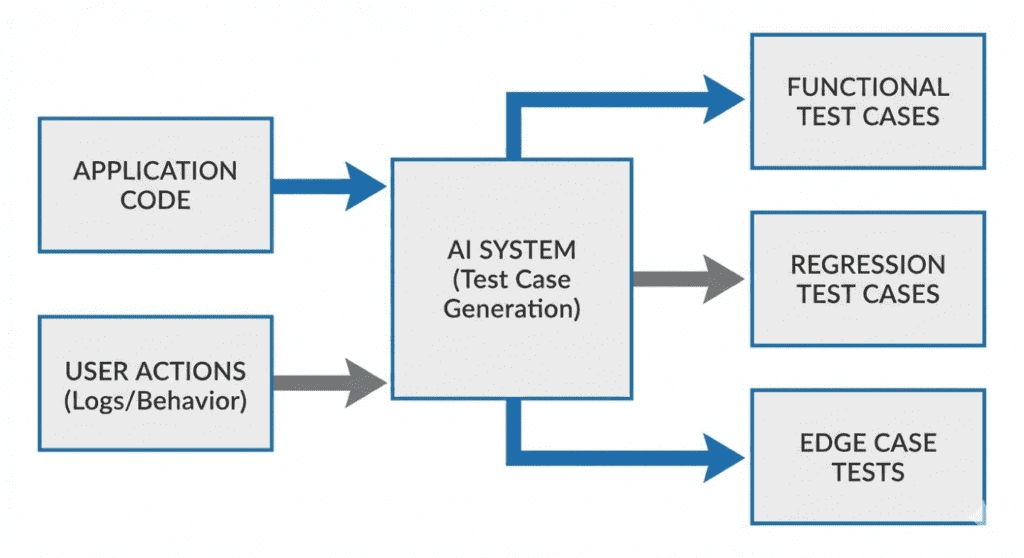
AI tools analyze application code, user flows, and system behavior to create test cases automatically. This removes the need for testers to manually write every test scenario.
AI-generated tests can include:
- Functional tests
- Edge cases
- Negative scenarios
- Performance checks
This saves time, improves coverage, and ensures consistent quality across releases.
2. Identifies Risky Code Changes
Whenever developers modify code, AI can analyze which parts of the system are most likely to break. It compares new changes with historical failure data.
This helps teams focus testing on high-risk areas instead of testing everything blindly.
Benefits:
- Smarter testing
- Faster validation
- Lower failure rates
3. Analyzes Crash Logs
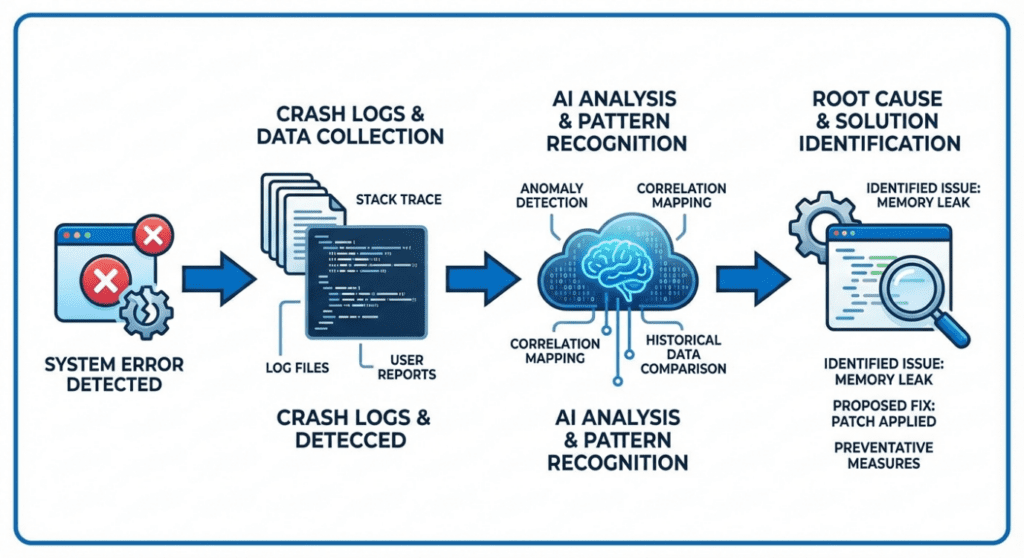
AI can read large volumes of system logs and crash reports. It identifies patterns and explains errors in simple language.
Instead of spending hours analyzing logs, teams get quick insights into:
- What went wrong
- Where it happened
- Why it happened
This speeds up debugging and improves system stability.
4. Predicts Future Failures
By learning from past defects, AI can predict where future issues might occur. This allows teams to prevent problems before users experience them.
Predictive testing improves:
- Reliability
- Performance
- Customer satisfaction
5. Suggests Bug Fixes
AI can recommend solutions based on previous fixes and best practices. Developers can use these suggestions as a starting point for resolving issues faster.
This reduces:
- Debugging time
- Trial-and-error
- Human error
6. Learns from Past Defects
The more data AI receives, the smarter it becomes. Over time, it learns which types of bugs occur most often and how to prevent them.
This creates a continuous improvement cycle for software quality.
Proactive Quality Assurance
Instead of reacting to problems after they occur, AI enables proactive quality assurance.
Teams can:
- Prevent failures
- Improve stability
- Reduce costs
- Increase user trust
AI does not replace human expertise. It enhances it.
What Is AI-Based Test Generation?
AI-based test generation means using Artificial Intelligence to automatically create test cases for software applications. Instead of human testers manually writing hundreds of test scenarios, AI tools analyze the application and generate tests on their behalf.
AI tools study several parts of your system, including:
Code Structure
The AI reads the program’s code to understand how different features work. It learns which functions, screens, and components exist and how they interact with each other. This helps AI identify what needs to be tested.
User Flows
AI observes how users move through the application. For example, how a user signs up, logs in, makes a payment, or submits a form. It uses this information to create tests that match real user behavior.
API Responses
Many applications depend on APIs (systems that exchange data). AI analyzes how the system responds to different API requests, such as success, failure, or slow responses. It then generates tests to check these scenarios.
Historical Bugs
AI learns from past issues and defects. If certain features caused problems before, AI focuses more testing on those areas to prevent similar issues in the future.
System Behavior
AI observes how the system behaves under different conditions, such as heavy traffic, low internet speed, or invalid user input. It creates tests to simulate these situations.
Types of Tests AI Can Generate
After analyzing the system, AI automatically creates different types of tests:
Unit Tests
These tests check small parts of the system, such as individual functions or calculations, to ensure they work correctly.
UI Tests
These tests verify that the user interface behaves as expected, such as buttons, forms, and navigation flows.
API Tests
These tests check how the system communicates with other services and ensures data is sent and received correctly.
Edge-Case Scenarios
These tests focus on unusual situations, such as invalid inputs, extreme values, or unexpected user behavior.
Why This Is Important
Traditionally, writing test cases requires:
- Time
- Technical knowledge
- Careful planning
- Repeated updates
For large systems, teams may need to write hundreds or thousands of test cases. This slows down development and increases costs.
AI removes this burden by generating tests automatically, allowing teams to focus on improving the product instead of writing repetitive test scripts.
Example: How AI Simplifies Test Writing
Traditional Approach (Manual)
A developer writes this test code:
@Test
public void checkInvalidEmail() {
assertThrows(Exception.class, () -> register(“abc”));
}
This requires:
- Understanding the system logic
- Knowing the programming language
- Writing correct test syntax
AI-Based Approach
The tester simply writes:
“Test registration with invalid email”
AI automatically generates the required test code.
What This Means for Non-Technical Teams
Even people without deep coding knowledge can:
- Describe what needs to be tested
- Let AI generate the technical details
- Review the results
This makes testing more accessible, faster, and less error prone.
Business Benefits of AI Test Generation
1. 60–70% Faster Test Creation
AI significantly reduces the time needed to create test cases. What used to take days can now be done in hours.
This means:
- Faster project delivery
- Shorter release cycles
- Quicker response to market changes
2. Better Test Coverage
AI explores more scenarios than humans can manually. It identifies hidden edge cases and uncommon user behaviors.
This reduces:
- Unexpected crashes
- User complaints
- System failures
3. Fewer Human Errors
Manual testing can contain mistakes such as:
- Missing scenarios
- Incorrect test logic
- Incomplete coverage
AI produces consistent and accurate test cases, reducing the risk of human error.
4. Faster Software Releases
With faster testing and fewer bugs, companies can release features more frequently without compromising quality.
This leads to:
- Higher customer satisfaction
- Competitive advantage
- Improved brand trust
Step-by-Step: How to Use AI for Test Case Generation
Step 1: Install an AI Tool
Popular tools include:
- GitHub Copilot
- Testim
- Mabl
- CodiumAI
These tools integrate with development environments and testing platforms.
Step 2: Open the Test File
The developer or tester opens the file where test cases are written.
Step 3: Describe the Scenario
Instead of writing complex code, the user writes a simple description such as:
- “Test login with wrong password”
- “Check payment failure scenario”
Step 4: Let AI Generate the Test
AI converts the description into actual test code automatically.
Step 5: Review & Refine
A human reviews the generated test to ensure:
- It matches business rules
- It reflects real user behavior
- It follows company standards
Step 6: Commit to Repository
The final test is saved and added to the project for future use.
Why Companies Should Adopt AI Test Generation
AI-based test generation helps organizations:
- Reduce manual workload
- Improve product quality
- Save development costs
- Increase delivery speed
- Empower non-technical teams
- Ensure consistent testing
Instead of spending time writing repetitive tests, teams can focus on:
- Innovation
- User experience
- Security
- Performance
Key Takeaway
AI transforms test case generation from a slow, technical process into a fast, simple, and intelligent workflow.
By using AI, companies can:
- Improve software reliability
- Reduce testing effort
- Accelerate releases
- Minimize risk
Understanding Debugging in Software Development
Debugging is the process of identifying, analyzing, and fixing errors (bugs) in software. When an application crashes, behaves unexpectedly, or performs slowly, developers must investigate the cause and apply a fix.
In traditional development, debugging is often one of the most time-consuming and stressful tasks. Developers must manually examine error logs, reproduce issues, analyze system behavior, and test multiple solutions before finding the correct fix.
As applications grow more complex, debugging becomes harder and more expensive.
This is where Artificial Intelligence (AI) significantly improves the debugging process.
Challenges with Traditional Debugging
Before understanding how AI helps, it’s important to know the limitations of traditional debugging methods.
- Error logs can be extremely long and difficult to understand
- Issues may be hard to reproduce consistently
- The same types of bugs appear repeatedly
- Debugging requires deep technical expertise
- Root cause analysis often involves guesswork
From a business perspective, slow debugging leads to:
- Increased downtime
- Delayed releases
- Higher maintenance costs
- Poor user experience
What Is AI-Based Debugging?
AI-based debugging uses machine learning and data analysis to automatically:
- Read and interpret error logs
- Detect patterns across failures
- Identify the most likely root cause
- Suggest potential fixes
Instead of developers manually searching for problems, AI assists them with instant insights.
How AI Analyzes Error Logs
Log Analysis
Modern applications generate thousands of logs every day. These logs contain information about system events, warnings, errors, and crashes.
AI tools can:
- Scan large volumes of logs in seconds
- Identify repeated error patterns
- Highlight abnormal behavior
- Filter out irrelevant data
This saves hours of manual investigation.
Example
Traditional Log Analysis
A developer manually searches through logs to find where the error occurred.
AI-Based Log Analysis
AI highlights:
“Crash caused by null reference in user session initialization.”
This immediate insight reduces investigation time significantly.
AI for Root Cause Analysis
Root cause analysis means finding the actual reason why a problem occurred, not just fixing the symptom.
AI excels at this by:
- Comparing current issues with historical defects
- Identifying correlations between events
- Understanding system behavior patterns
Example Scenario
An application crashes when users log in.
AI analyzes:
- Crash logs
- Recent code changes
- User behavior
- Server response times
AI identifies:
“Login failure occurs when user profile data is missing due to delayed API response.”
Instead of guessing, developers receive a clear direction.
AI-Suggested Fixes
Once the root cause is identified, AI can suggest fixes based on:
- Past solutions
- Best coding practices
- Similar issues from other projects
Example Fix Suggestion
Error:
NullPointerException at LoginService.kt:52
AI Suggestion:
“Add a null check for userSession before accessing it.”
if (userSession != null) {
proceedLogin()
}
Developers can then review and apply the fix.
Benefits for Non-Technical Teams
AI-based debugging is not only helpful for developers. It also benefits non-technical stakeholders:
- Faster issue resolution
- Clear explanations of problems
- Reduced downtime
- Better communication between teams
Product managers and business leaders receive clear insights, not complex technical jargon.
Reducing Repetitive Debugging
Many software issues are repetitive:
- Configuration errors
- Missing validations
- API failures
- Data format mismatches
AI recognizes these repeated patterns and provides instant recommendations, preventing teams from solving the same problem again.
This improves:
- Developer productivity
- Team morale
- Overall efficiency
Step-by-Step: AI-Based Debugging Workflow
Step 1: Capture the Error
The system records crash reports, logs, or error messages automatically.
Step 2: AI Analyzes the Data
AI scans logs, stack traces, and system metrics.
Step 3: Identify Root Cause
AI pinpoints the most likely cause of the issue.
Step 4: Suggest Fix
AI provides a possible solution or improvement.
Step 5: Human Review
Developers review the suggestion to ensure it aligns with business logic.
Step 6: Apply & Test
The fix is applied and validated through testing.
Business Benefits of AI-Based Debugging
1. Faster Issue Resolution
Problems that once took days can now be resolved in hours.
2. Reduced Downtime
Faster fixes mean systems stay available and reliable.
3. Lower Support Costs
Fewer production issues reduce customer support workload.
4. Improved User Experience
Stable applications increase customer satisfaction and trust.
Why AI Does Not Replace Developers
AI does not replace human expertise. Instead, it:
- Assists developers
- Reduces manual effort
- Provides insights
- Improves decision-making
Humans remain responsible for:
- Business rules
- Final decisions
- Ethical considerations
Key Takeaway
AI transforms debugging from a reactive, time-consuming task into a fast, intelligent, and structured process.
By using AI for debugging and root cause analysis, companies can:
- Reduce downtime
- Improve software stability
- Increase developer productivity
- Deliver better user experiences
Page 4 – AI for Predictive Testing & Failure Prevention
What Is Predictive Testing?
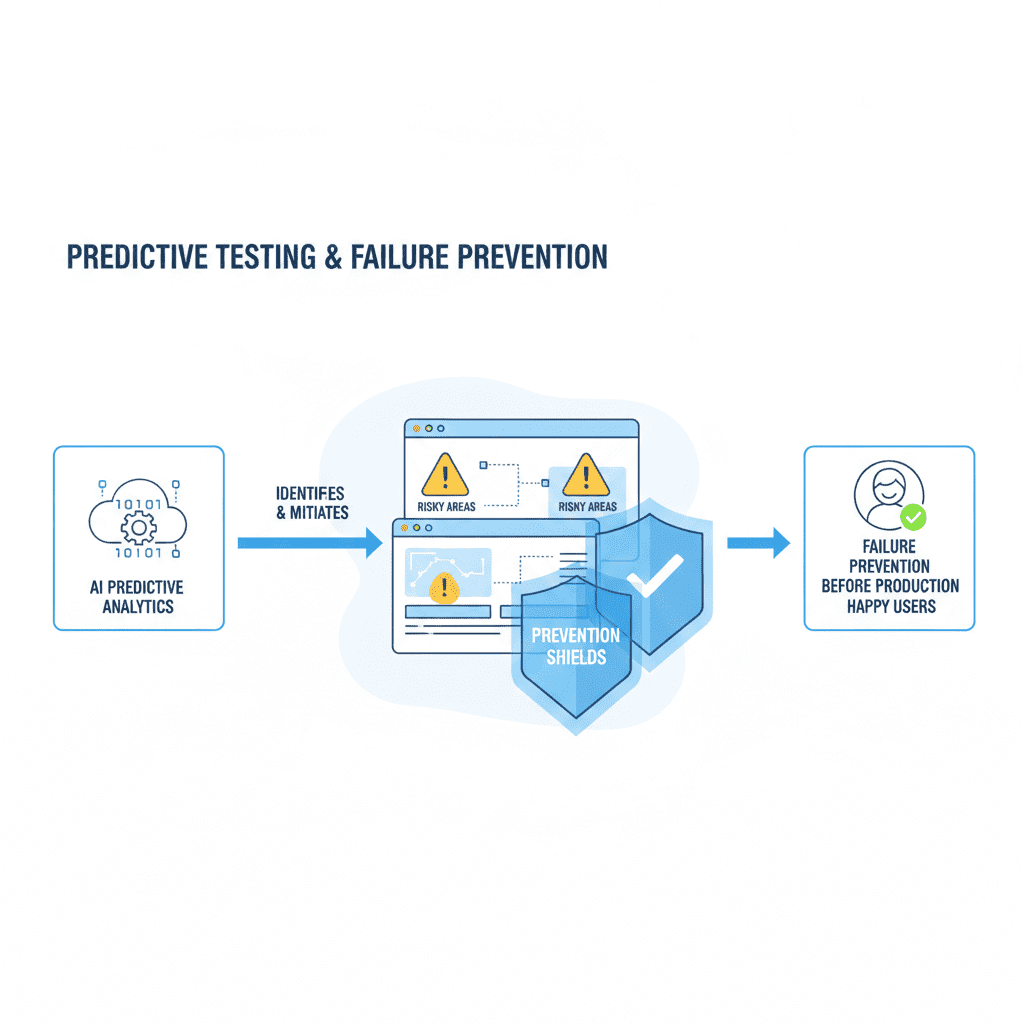
Predictive testing is a modern approach where Artificial Intelligence (AI) is used to anticipate software problems before they happen. Instead of waiting for bugs to appear after a release, AI analyzes historical and real-time data to predict which parts of the system are most likely to fail.
In traditional testing, teams react to problems after users experience them. Predictive testing changes this by allowing teams to act before failures occur.
AI can predict:
High-Risk Code Areas
Some parts of an application are more complex or change more frequently than others. These areas often contain more bugs. AI identifies these risky sections by analyzing past failures and recent changes.
Features Likely to Fail
AI detects which features have a history of issues or unusual behavior. This allows teams to focus testing on features that matter most to users.
Performance Bottlenecks
AI can predict where the system might slow down, especially during heavy usage, such as during sales events or peak traffic hours.
Why Predictive Testing Matters
Without predictive testing:
- Bugs reach production
- Customers experience issues
- Emergency fixes are required
- Business operations are disrupted
With predictive testing:
- Problems are prevented
- Systems remain stable
- Customers stay satisfied
- Business risk is reduced
This makes predictive testing a powerful tool for business continuity.
How Predictive Testing Works
AI uses data from multiple sources to understand how the system behaves and where it may fail.
Past Failures
AI studies previous bug reports, crash logs, and incident records. If certain modules failed before, AI assumes they may fail again unless improved.
Test Results
AI analyzes which tests frequently fail and under what conditions. This helps identify weak areas in the system.
Code Changes
Whenever developers update the software, AI checks which files were changed and how risky those changes are based on past data.
User Behavior
AI observes how users interact with the system. If many users struggle with a feature, that area is flagged for further testing.
What AI Does with This Data
AI combines all this information to:
- Detect hidden risk patterns
- Rank system components by risk
- Highlight areas needing attention
- Recommend focused testing
This helps teams test smarter, not harder.
Example: Smart Risk Detection
AI flags:
“Payment module has a 35% higher failure probability.”
This means:
- Payment features had past issues
- Recent changes increased risk
- User activity shows unusual behavior
Instead of testing everything equally, the QA team focuses more on the payment module.
Why This Is Important
Payment failures can cause:
- Lost revenue
- Customer frustration
- Brand damage
By prioritizing testing on high-risk areas, businesses protect both revenue and reputation.
Business Benefits of Predictive Testing
1. Prevents Production Issues
Predictive testing identifies problems before customers see them. This prevents system crashes, broken features, and service interruptions.
2. Improves System Reliability
When high-risk areas are tested more thoroughly, the system becomes more stable and dependable.
3. Saves Maintenance Costs
Fixing bugs early is much cheaper than fixing them after release. Predictive testing reduces expensive emergency fixes.
4. Protects Brand Reputation
Stable software builds trust. Customers are more likely to stay loyal to brands that offer smooth, reliable digital experiences.
Implementation Steps Explained
Step 1: Connect AI to Repository
The AI tool is connected to the company’s code repository (where software is stored). This allows AI to monitor changes automatically.
Purpose:
To track new updates and analyze risk in real time.
Step 2: Import Test History
AI is given access to previous test results and bug reports.
Purpose:
To learn from past failures and identify patterns.
Step 3: Train the Model
AI studies the collected data and learns how the system behaves.
Purpose:
To improve prediction accuracy over time.
Step 4: Run Predictions
AI generates reports showing which parts of the system are most likely to fail.
Purpose:
To guide testing priorities.
Step 5: Prioritize Testing
QA teams focus their efforts on high-risk areas instead of testing everything equally.
Purpose:
To save time while improving quality.
Why Predictive Testing Is Valuable for Non-Technical Teams
Business leaders, managers, and support teams benefit because:
- Fewer customer complaints
- Fewer emergency situations
- Better planning
- Improved service reliability
Predictive testing helps organizations stay proactive instead of reactive.
Key Takeaway
Predictive testing transforms quality assurance from a reactive process into a strategic business advantage.
By using AI to anticipate failures, companies can:
- Reduce operational risk
- Improve system stability
- Lower maintenance costs
- Protect customer trust
Page 5 – AI for Continuous Testing in CI/CD
What Is Continuous Testing?
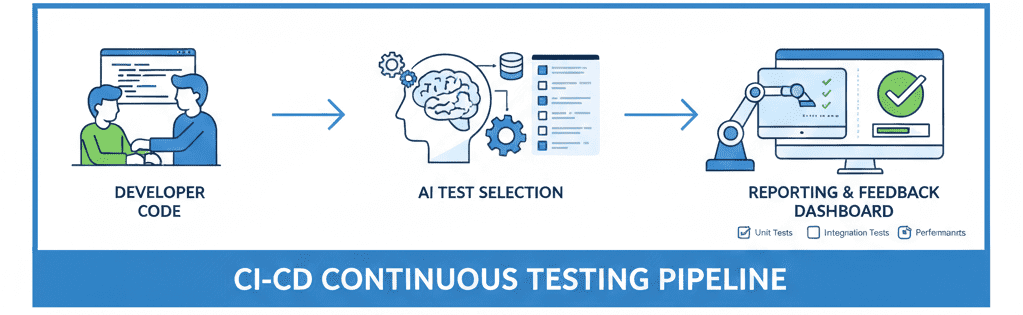
Continuous Testing is a process where software is tested every time a change is made to the system.
Instead of waiting until the end of development, tests run automatically throughout the entire development cycle.
Whenever a developer updates the code:
- Tests start automatically
- Results are generated
- Problems are detected early
- Feedback is sent to the team
This ensures that software quality is always maintained, not just before release.
Why Continuous Testing Is Important
In modern software development, updates happen frequently.
Without continuous testing:
- Bugs remain hidden
- Issues reach customers
- Fixes become expensive
- Releases get delayed
With continuous testing:
- Problems are found early
- Fixes are easier
- Releases are smoother
- Customer experience improves
AI makes this process faster, smarter, and more efficient.
How AI Improves CI/CD
CI/CD (Continuous Integration / Continuous Deployment) is the pipeline that automatically builds, tests, and releases software.
AI enhances this pipeline by making intelligent decisions.
1. Skipping Low-Risk Tests
Not all tests are equally important.
AI analyzes past data to identify which parts of the system are less likely to fail.
This allows AI to:
- Skip unnecessary tests
- Save execution time
- Reduce server costs
- Speed up releases
Instead of running thousands of tests blindly, AI focuses only on what matters most.
2. Detecting Flaky Tests
Flaky tests are tests that sometimes pass and sometimes fail without any real issue in the code.
They waste time and confuse teams.
AI identifies flaky tests by:
- Monitoring repeated failures
- Analyzing patterns
- Flagging unreliable tests
This helps teams:
- Trust test results
- Reduce false alarms
- Improve test reliability
3. Optimizing Test Selection
AI chooses the most relevant tests based on:
- Recent code changes
- Risk level
- Past failure history
This ensures:
- Faster test execution
- Better coverage
- Less resource usage
Teams no longer need to manually decide which tests to run.
4. Analyzing Failures Automatically
When a test fails, AI:
- Reads error logs
- Finds the root cause
- Suggests possible fixes
- Categorizes the issue
This reduces debugging time and helps developers fix problems faster.
Example CI/CD Flow (AI-Powered)
Step 1: Developer Pushes Code
A developer submits new code to the system.
Purpose:
To update features, fix bugs, or add improvements.
Step 2: AI Selects Relevant Tests
AI reviews the changes and selects the most important tests to run.
Purpose:
To avoid wasting time on unnecessary tests.
Step 3: Tests Run Automatically
Selected tests execute without manual intervention.
Purpose:
To quickly verify system stability.
Step 4: AI Analyzes Results
AI reviews failures, identifies patterns, and highlights risks.
Purpose:
To provide clear insights instead of raw data.
Step 5: Report Is Generated
A simple report is shared with the team.
Purpose:
To guide next actions and fixes.
Business Benefits of AI in Continuous Testing
1. Faster Releases
AI reduces testing time by selecting only the necessary tests.
This allows companies to release updates faster without compromising quality.
2. Lower Testing Costs
Running fewer tests saves:
- Server resources
- Engineering hours
- Infrastructure costs
AI ensures money is spent wisely.
3. More Stable Builds
AI identifies risky changes early, reducing broken builds and failures.
4. Less Manual Effort
Teams spend less time:
- Writing scripts
- Running tests
- Investigating failures
They can focus on innovation instead.
Why This Matters for Non-Technical Teams
Managers and business leaders benefit because:
- Project timelines become predictable
- Fewer emergency fixes
- Better planning
- Higher customer satisfaction
AI-powered CI/CD improves both technical quality and business outcomes.
Key Takeaway
AI transforms CI/CD from a simple automation tool into a smart quality guardian.
With AI-powered continuous testing, companies achieve:
- Faster delivery
- Lower costs
- Higher reliability
- Better customer trust
6. Limitations of AI in Testing & Debugging
(And How to Use AI the Right Way)
Artificial Intelligence is transforming software testing, but it is not a “magic solution.” Like any technology, AI has limitations. Understanding these limitations helps companies use AI safely, effectively, and responsibly.
Below are the four most important limitations — explained in a way that both technical and non-technical readers can understand.
1. AI Can “Hallucinate” (Give Confident but Incorrect Answers)
AI systems sometimes generate answers that sound correct but are actually wrong or incomplete. This is called “hallucination.”
In testing and debugging, this can mean:
- Suggesting a fix that does not solve the real issue
- Misinterpreting error logs
- Creating test cases that don’t match real user behavior
AI does not truly “understand” your system the way a human does. It predicts answers based on patterns from its training data.
Why This Happens
AI is trained on large datasets of code, documentation, and examples. It uses probability to guess the most likely response — not guaranteed truth.
If your project:
- Uses custom logic
- Has unique business rules
- Has rare edge cases
The AI may give generic answers that don’t fit your situation.
Business Impact
If teams blindly trust AI suggestions:
- Bugs may remain unresolved
- Wrong fixes may be deployed
- System stability can suffer
How to Use AI Safely
- Always review AI-generated fixes
- Validate with real testing
- Cross-check with developers or QA teams
- Treat AI as an assistant, not a decision-maker
Benefit When Used Correctly
When used carefully, AI:
- Speeds up analysis
- Offers helpful starting points
- Reduces debugging time
But human review is always required.
2. AI Lacks Business Context
AI understands code patterns —
but it does not understand your business goals.
It doesn’t know:
- Your customer priorities
- Your legal requirements
- Your company policies
- Your product strategy
For example, AI may suggest:
“Remove this validation to simplify the flow”
But that validation might exist for:
- Compliance
- Security
- Financial accuracy
- User safety
Why Business Context Matters
Testing is not just about “does the app work?”
It’s about:
- Does it follow business rules?
- Does it protect user data?
- Does it match company standards?
AI cannot judge these aspects.
Business Risk
Without business context:
- Critical rules may be broken
- Compliance risks increase
- Brand reputation may be harmed
How to Solve This
- Combine AI with domain experts
- Review suggestions with product owners
- Keep documentation updated
- Use AI for technical help, not policy decisions
Benefit of Human + AI
AI handles:
- Code patterns
- Error detection
- Test automation
Humans handle:
- Business logic
- Ethics
- Legal rules
- Customer impact
This balance creates safe, reliable software.
3. AI Depends on Training Data
AI only knows what it has been trained on.
If the training data:
- Is outdated
- Lacks your tech stack
- Doesn’t include your use cases
Then the AI’s output will also be limited.
Example
If your system uses:
- A custom API
- A rare programming framework
- Internal tools
AI may:
- Give incorrect examples
- Suggest unsupported methods
- Miss important edge cases
Business Impact
This can lead to:
- Incorrect test coverage
- Missed bugs
- Poor system reliability
How Companies Can Improve AI Accuracy
- Provide internal documentation
- Share logs and real examples
- Use project-specific prompts
- Train custom AI models (if needed)
Benefits of Good Training Data
With better data, AI can:
- Generate accurate tests
- Understand system behavior
- Predict failures more reliably
Good data = Better AI results.
4. AI Needs Human Validation
AI can assist, but it cannot replace human judgment.
Every AI-generated:
- Test case
- Bug fix
- Optimization
- Recommendation
Must be reviewed by a human.
Why Human Validation Is Critical
AI does not:
- Understand business risk
- Consider user emotions
- Evaluate long-term impact
- Take responsibility for outcomes
Only humans can do that.
Best Validation Process
- AI generates suggestion
- Developer reviews logic
- QA verifies behavior
- Business confirms alignment
- Changes are approved
Business Benefits
This ensures:
- High-quality releases
- Lower risk
- Better user trust
- Fewer production issues